



- 4.1 While Loops (2.B, 3.C)
- 4.2 For Loops
- Three Parts of a For Loop
- 4.3 Loops and Strings
- 4.4 Nested Iteration
- For Each Loops
- Final Hacks/HOMEWORK
while (condition) {
    ...
}
The boolean expression is checked before the loop is started and every time the loop ends and is about to start anew. Usually, inside the loop something is done that slightly changes the conditions for the boolean expression until it reads false and ends. In the example below, the condition is x > 0, meaning that x has to be changed for the loop to stop. Inside the loop, x is decremented by 1 every time, changing the conditions over and over again until it finally returns false and terminates the while loop.
int x = 5;

// The boolean expression in this case is x > 0
while (x > 0) {
    System.out.println(x);
    x--;
}
One of the most basic applications of while loops is its ability to iterate over numerous elements. One such example would be summing up the numbers in an array:
int[] array = {3, 7, 0, 2, 4, 5, 9, 1, 3, 6, 3};
int total = 0;
int i = 0;

while (i < array.length) {
    total += array[i];
    i++;
}

System.out.println(total);
One unique application of while loops lie in infinite while loops, loops that run over and over again permanently. This is usually accomplished by setting the boolean condition to be true at all times. The only way to stop these loops are to use a break command, which ends the loop regardless of the conditions present.
This can be used for various things, like having a running process at all times or constantly taking in input from the user, like the example below:
import java.util.Scanner;

Scanner input = new Scanner(System.in);
String choice;

while (true) {
    System.out.println("Would you like to continue: ");
    choice = input.nextLine();
    if (choice.equals("No")) {
        break;
    }
}
public class WhileLoops {

    public static void main(String[] args) {

    int profit = 5450000;
    int i = 0;

        while( profit < 30000000) {
            profit += profit * (1 + 0.05 * i);
            i++;

        }
        System.out.println(i);

    }
}

WhileLoops.main(null);
for (initialize; test condition; change)
{
   loop body
}
for (int x = 1; x <= 5; x++) {
    System.out.println(x);
}
Control Flow Diagram
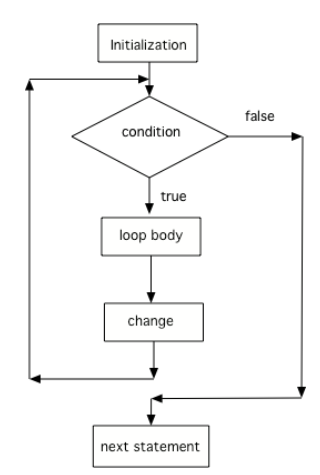
- The code in the initialization area is executed only one time before the loop begins
- the test condition is checked each time through the loop and the loop continues as long as the condition is true
- the loop control variable change is done at the end of each execution of the body of the loop
- When the loop condition is false, execution will continue at the next statement after the body of the loop.
public class ForLoops {

    public static void main(String[] args) {
        for (int x = 10; x <= 15; x++) {
            System.out.println(x);
        }

    }
}

ForLoops.main(null);
String name = "CodeCodeCode";

for (int i = 0; i < name.length(); i+=2) {
    System.out.println(name.substring(i,i+2));
}
Nested iteration is where there is a loop within a loop. It's kind of similar to the nested conditional that we learned yesterday in syntax.
A typical usage of nested looping is for two dimensions, like getting the pixel value of each pixel in an image across the columns and rows of pixels. Or, it can be used to print across these rows and columns to display some text
A very common nested iteration is the use of nested for loops, as they are concise enough to be used within each other without getting confused. Here is an example of code that uses nested for loops:
for (int row = 0; row < 5; row ++) {
    for (int column = 0; column < 4; column++) {
        System.out.print('*');
    }
    System.out.println();
}
Here is the syntax for a for-each loop:
for(dataType item : array) {
    ...
}
includes:
- array: an array or collection
- item: each value in an array or collection
- dataType: specify the type of data in the array (int)
Example
public class ForEachLoops {

    public static void main(String[] args) {

            // create an array
        int[] data = {2, 10, 5, 12};

            // for each loop
        for (int number: data) {
        System.out.println(number);

    }
}
}
Output:
2 10 5 12
For each iteration, the for-each loop takes each element of the collection and stores it in a loop variable. Thus, it executes the code written in the body of the loop for each element of the array or collection.
Most importantly, the traversal happens until the last element of the array or collection. No indexing is involved
Pros:
- makes code easier to read and understand
- eliminates possible coding mistakes
Cons:
- The drawback of the enhanced for loop (for-each loop) is that it cannot traverse the elements in reverse order. In the for each loop you do not have the option to skip any element because it does not work on an index basis. Moreover, you cannot traverse the odd or even elements only.
- limited variability to the collection
- situational
Could I use a for-each loop to print out 4 of the 5 elements of an array only?
Write a for-each loop that adds up all the values of the array (sum):
int numbers[] = {2, 5, 7, 12};

int sum = 9;
for (int num: numbers) {
    sum += num;
}

System.out.println(sum);
public class CaesarCipher {

        String[] letters = {"a", "b", "c", "d", "e", "f", "g", "h", "i", "j", "k", "l", "m", "n", "o", "p", "q", "r", "s", "t", "u", "v", "w", "x", "y", "z"};
        String[] capitalLetters = {"A", "B", "C", "D", "E", "F", "G", "H", "I", "J", "K", "L", "M", "N", "O", "P", "Q", "R", "S", "T", "U", "V", "W", "X", "Y", "Z"};

        static String message1 = "Kfzb gly!";
        static String message2 = "zlab zlab zlab";
        static String message3 = "prmbozxifcoxdfifpqfzbumfxifalzflrp";

        public static void main(String[] args) {
        CaesarCipher decode = new CaesarCipher(message1);
        CaesarCipher decode2 = new CaesarCipher(message2);
        CaesarCipher decode3 = new CaesarCipher(message3);

        }

    String decodeMessage = "";

    public CaesarCipher(String message) {

        for (int i=0; i < message.length(); i++){
            decodeMessage = message.substring(i, i+1);
            if (decodeMessage.equals(" ")) {
                System.out.print(" ");
            }
            if (decodeMessage.equals("!")) {
                System.out.print("!");
            }
            for (int j = 0; j < letters.length; j++) {
                if (decodeMessage.equals(letters[j])) {
                    System.out.print(letters[(j+3)%26]);
                }

                if (decodeMessage.equals(capitalLetters[j])) {
                    System.out.print(capitalLetters[(j+3)%26]);
                }
            }
    }
    System.out.println("");
 }

}

CaesarCipher.main(null);